Music Bot — TrackOnSight

Music bot

Room music control without breaking conversation flow.

YouTube Music control for Free4Talk rooms

Music Bot lets you control YouTube Music from inside a Free4Talk room using structured commands or natural language. Premium adds AI AutoPlay so playback can continue when the queue runs out.

v2.0

Latest update: more flexible command handling

Hybrid mode for prefix and natural language
AutoPlay toggle directly in the popup
Smart AI song suggestions for Premium
Three supported prefix symbols: !, /, #

Capabilities

Focused features for actual room use.

The feature set is built around control speed, queue reliability, and low setup friction rather than flashy automation language.

AI song suggestions

Premium suggestions based on the current listening direction, so the queue does not stall when people stop adding songs.

AI AutoPlay

When the queue runs out, the bot can continue playback automatically with related music instead of leaving dead air in the room.

Three command modes

Use prefix-only, natural language, or hybrid mode. You can switch mode based on how strict or relaxed the room should feel.

Private setup

The extension uses your own Gemini API key and is designed to run in the browser without centralised tracking.

Multi-user control

Authorise specific usernames so more than one person can manage music inside the same room.

Queue control

Add, skip, pause, resume, inspect queue state, and manage playback without leaving the room flow.

Screens

What the extension actually looks like.

These screenshots should explain the product better than any decorative marketing treatment.

New feature
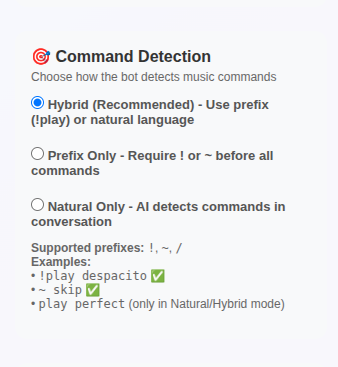
Music Bot command detection options

Flexible command detection

Switch between prefix-only, natural language, and hybrid mode depending on how your room prefers to interact.

New feature
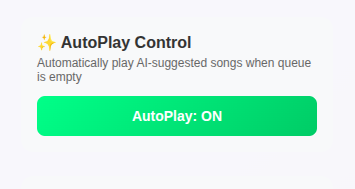
Music Bot AutoPlay toggle

One-click AutoPlay control

Turn AI AutoPlay on or off directly from the popup instead of digging through setup screens.

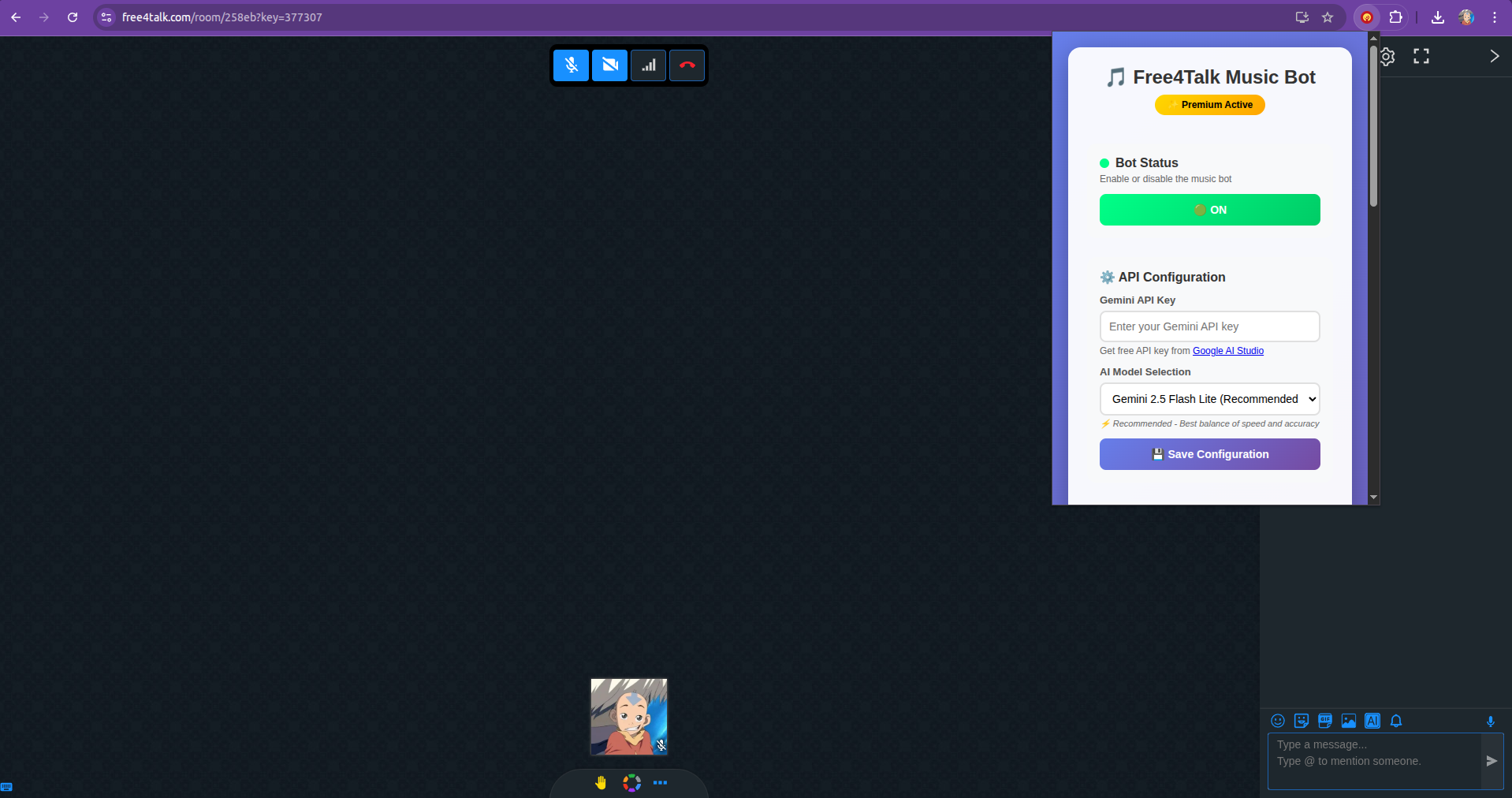
Music Bot extension popup

Configuration panel

API key setup, model selection, command mode, AutoPlay control, and authorised users all live in one compact interface.

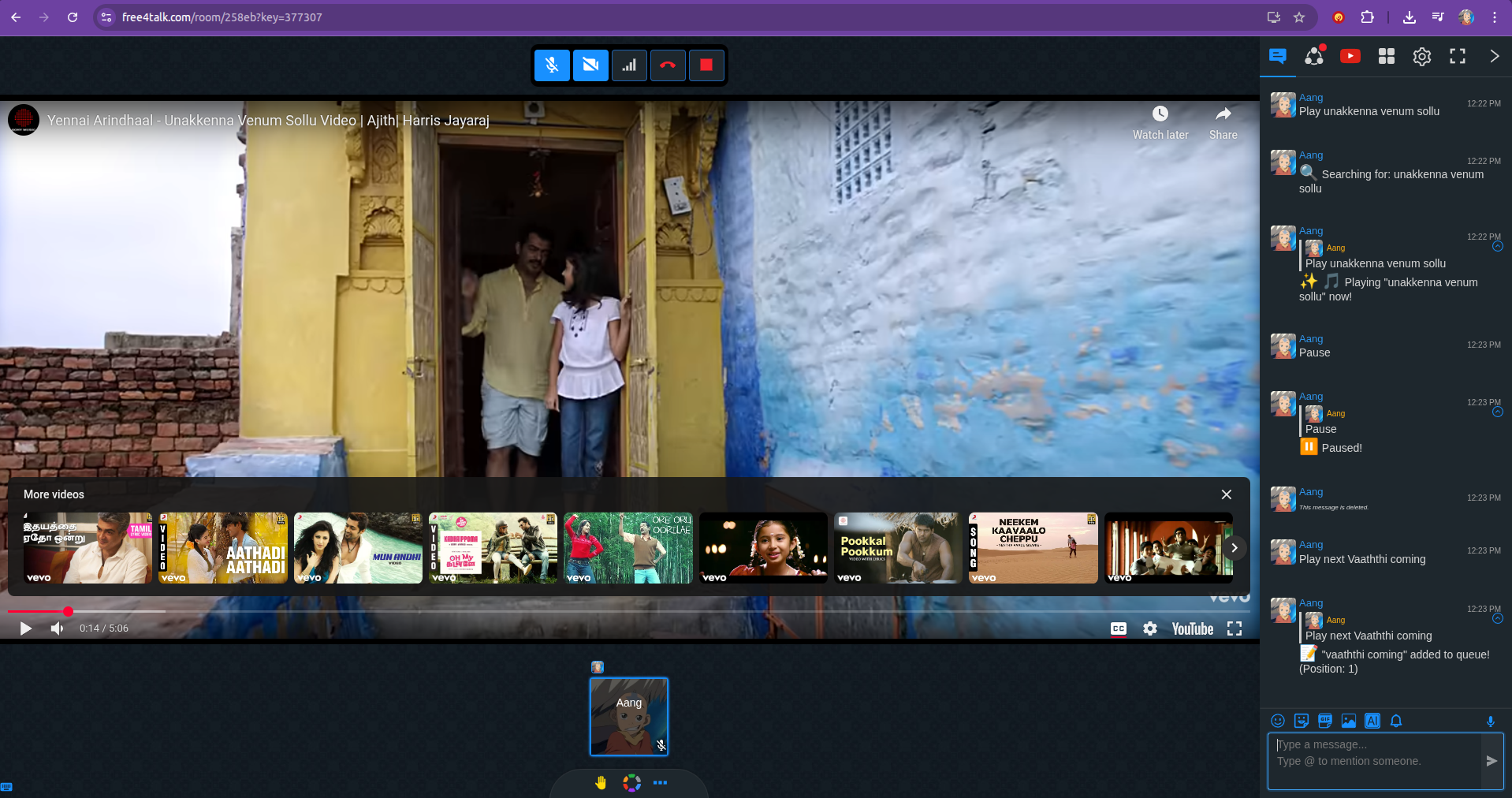
Music Bot working live inside Free4Talk

Live room workflow

Keep YouTube Music open and control playback from the room using either direct commands or natural prompts.

Examples

Representative command behaviour.

These examples show how the bot responds in different modes and room situations.

Prefix mode
You
!play shape of you
Music Bot
Playing Shape of You - Ed Sheeran
Natural mode
You
can you play some lofi music?
Music Bot
Playing Lofi Hip Hop Radio - Beats to Relax / Study to
Hybrid mode
User 1
skip this one
User 2
add bohemian rhapsody to queue
Music Bot
Skipped. Added Bohemian Rhapsody - Queen to queue.
AI AutoPlay
Music Bot
Queue ended. AutoPlay is enabled. Looking for similar songs…
Music Bot
Now playing Blinding Lights - The Weeknd
Queue view
You
!queue
Music Bot
Queue (3 songs) 1. Levitating - Dua Lipa 2. Starboy - The Weeknd 3. bad guy - Billie Eilish
Volume control
You
volume 50
Music Bot
Volume set to 50%

Command modes

Choose how strict or natural the room should feel.

Command modes are one of the product’s strongest ideas because they let the same extension fit very different room cultures.

!

Prefix mode

Commands must start with !, /, or #.

Examples
!play despacito
/skip
#pause
!queue
/volume 70
Best for: Rooms that want music commands clearly separated from normal chat.
Text

Natural mode

Talk naturally and let the bot infer music commands from the sentence.

Examples
can you play some lofi?
skip this one
add bohemian rhapsody
what's playing?
Best for: Casual rooms where music should blend into conversation.
Both

Hybrid mode

Prefix commands and natural language both work at the same time.

Examples
!play shape of you
skip this one
/queue
add blinding lights
Best for: Mixed rooms where people type differently and you want maximum flexibility.

Installation flow

Setup is short and direct.

The extension is ZIP-based, so the setup flow matters. This is the exact sequence most users follow.

Step 1

Download extension

Download the ZIP file and extract it anywhere on your machine.

Step 2

Get a Gemini API key

Open Google AI Studio, sign in, and create a free API key.

Step 3

Configure settings

Paste your API key, pick a command mode, and define authorised users if needed.

Step 4

Start using it

Join a Free4Talk room, keep YouTube Music open, and start controlling playback.

Pricing

Start free, pay only for the AI-heavy layer.

The free plan already includes the main interaction model. Premium is mainly about continuity and suggestion behaviour.

Free

$0/ forever
  • Natural language commands
  • Prefix, natural, and hybrid modes
  • Manual queue management
  • Multi-user access control
  • Your own Gemini API key
  • Unlimited devices
  • No ads
Download free
Recommended

Premium

$5/ month
  • Everything in Free
  • AI-powered AutoPlay
  • Smart song suggestions
  • Priority support
  • 2 devices per license
Get Premium

Version history

The product has already moved beyond a first release.

v2.0CurrentLatest release
  • Added Hybrid command detection mode
  • AutoPlay toggle directly from popup UI
  • Smart song suggestions via Gemini AI
  • Three prefix symbols supported: !, /, #
  • Improved natural language parsing
  • Real-time queue status display
v1.0InitialFirst release
  • Natural language music control
  • YouTube Music integration
  • Multi-user authorisation
  • Basic queue management
  • Gemini API support

FAQ

Common setup and licensing questions.

Yes. The base version is free. You only need your own Gemini API key from Google for supported AI-driven behaviour.
Free includes the core command system and manual queue control. Premium adds AI AutoPlay and smarter song suggestion behaviour.
Go to Google AI Studio, sign in with your Google account, and generate an API key. The setup is usually quick.
Yes. The extension controls a YouTube Music tab, so that tab needs to remain open in the same Chrome window.
The free tier can be used on multiple devices. Premium is described here as covering two devices per license.
There is no recurring subscription logic described on this page. Premium remains active until the purchased license period ends.

Ready to add music to your room?

Free to start, no TrackOnSight account required, and straightforward to install.
Desktop ChromeYouTube Music tab requiredGemini key for AI features